Article
ChatGPT CSV File Limit: Why Big Files Fail and What Works
ChatGPT takes CSV files up to about 50 MB, but smaller files can still fail or be read only in part. The limits, and how to make your file fit.
ChatGPT takes CSV files up to about 50 MB. OpenAI, the company behind ChatGPT, calls that figure approximate, because it depends on how much is in each row. On a Free account you can also upload only three files a day.
Being under 50 MB doesn’t guarantee a full answer, though. OpenAI’s own help says a file can upload fine and still be too big to analyse completely, and the reply may not say so. Here’s how to check.
Most files fit once you delete the columns your question doesn’t need. If yours still won’t, or you ask about the same data every week, a database is a better home for it: software built to answer questions over every row. It takes more setting up than a chat, so try the simple fixes first.
How many rows fit in 50 MB
There’s no fixed number. We made an example file to show why: a year of orders from a made-up online shop, with one row for each product on each order, the way shop platforms export them.
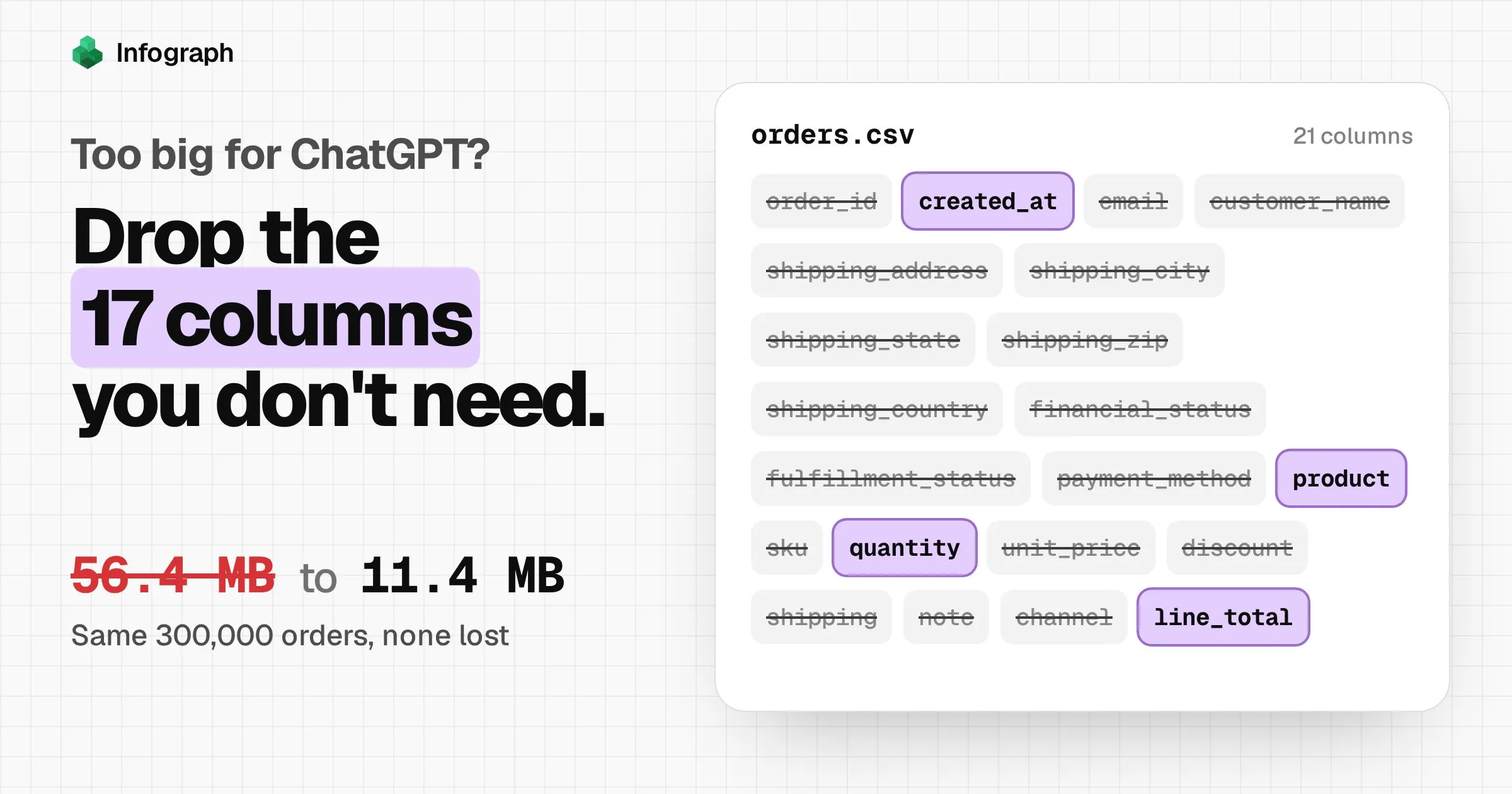
It has 300,000 rows and 21 columns, including the customer’s email, their shipping address and a note field. It comes to 56 MB, just over ChatGPT’s limit.
Keep only the four columns a sales question needs (the date, the product, the quantity and the line total) and the same 300,000 rows take 11 MB.
Long text such as emails, addresses and notes fills 50 MB much sooner than dates and numbers do. So a wide export might hit the limit at a few hundred thousand rows, while a narrow one holds over a million.
To see your own file’s size, choose Get Info on a Mac, or look at its Size in File Explorer on Windows, which shows it in KB: 50 MB is about 50,000 KB.
The limits in ChatGPT, Claude and Gemini
| ChatGPT | Claude | Gemini | |
|---|---|---|---|
| Biggest CSV | About 50 MB | 30 MB to analyse | 100 MB |
| Upload caps | 3 files a day on Free; 80 every 3 hours | 20 files per chat | 10 files per prompt |
| Source | OpenAI | Uploads, analysis |
We checked these pages on 21 November 2026.
You may see 512 MB quoted elsewhere. That’s ChatGPT’s limit for documents such as PDFs; spreadsheets get about 50 MB.
Claude lets you attach files up to 500 MB. But its page on code execution, the feature that does the sums on a CSV, says 30 MB per file, so plan on 30 MB for a CSV you want analysed. Gemini lets you attach more files on Google’s paid AI plans.
If ChatGPT says you’ve reached your upload limit, OpenAI says to wait for the retry time shown in the message. ChatGPT doesn’t show how much of your allowance is left, and failed uploads can count towards it. On a Free account, three tries with a file that’s too big can use up your day, so trim it before you upload.
Why a CSV under the limit can still fail
When you ask ChatGPT about a spreadsheet, it writes a short program in Python, a programming language, and runs it on your file in a temporary workspace that comes with the chat. Claude does the same. That workspace can let you down in two ways, even when your file is under the limit.
It stops with an error
The workspace has limited room and limited time. OpenAI doesn’t publish its limits. Anthropic says it caps how long each task in Claude can run. A big file can hit those limits, and the analysis stops partway through with an error.
It answers from part of the file
This one is harder to spot. OpenAI’s help on data analysis says a file “may upload successfully but still be too large, complex, image-heavy, or poorly structured for complete analysis.” The reply may not tell you. OpenAI’s advice, if a result looks incomplete, is to ask ChatGPT to look at specific rows, columns or sections, or to split the file.
A tidy file helps. OpenAI asks for column names in the first row, one row per record, and no blank rows or second tables breaking up the data. It also says lots of complex formulas can get in the way, so if your data is a spreadsheet full of formulas, upload a CSV copy, which keeps only the values.
Check it used every row
Before you upload, get two numbers yourself:
- How many rows your file has, not counting the header row.
- The total of one column you care about, such as sales.
In Excel, select a column that’s filled in on every row. The bar at the bottom of the window shows its Count, which is your row count plus one for the header. Select the sales column and the same bar shows its Sum.
Then add this to your question, with your own column’s name in place of “sales”, so the check covers the answer you’ll rely on:
Also tell me how many rows you used, not counting the header, and the total of the sales column.
If either number is different from yours, the answer didn’t use the whole file. For anything important, OpenAI also suggests asking to see the code ChatGPT ran and checking it before you rely on the answer.
Excel can’t open more than 1,048,576 rows. With a longer CSV, it loads the first part and warns you, and if you save over the file, the rest is lost (Microsoft). For a file that long, our free CSV Viewer opens it in your browser and shows the row count. A file that long is also a sign the data belongs in a database.
It’s the same idea as our test for Google Sheets links that ChatGPT can’t open: ask for something you already know, and compare.
Make the file fit, smallest change first
Work on a copy and keep the original.
Delete the columns you don’t need
This usually saves the most. In our example, deleting 17 of the 21 columns took the file from 56 MB to 11 MB without losing a single order, so the row count and every total stayed the same.
Not sure which questions you’ll ask? Keep the dates, the amounts and anything you’d group by, such as product or region. Emails and addresses are usually the widest columns. Leaving them out also keeps your customers’ details out of ChatGPT. On the web it saves a copy of each file you upload to your Library (called Space on some accounts), and deleting the chat doesn’t delete that copy (OpenAI).
You can delete columns in Excel or Google Sheets, or in our free CSV Editor, which runs in your browser without uploading the file. If the file is longer than Excel’s 1,048,576 rows, use the CSV Editor, not Excel.
Keep only the rows you need
If the question is about last quarter, filter to last quarter and save just those rows. Our CSV Viewer can filter a file and export only the rows you kept. The catch: answers only cover the rows you kept.
Upload totals instead
If you only need totals, make them first with a PivotTable, the summary table built into Excel and Google Sheets. For a CSV too long for Excel, Microsoft’s route is Data, then From Text/CSV, then Load To and PivotTable Report, which totals the whole file without putting every row on the sheet.
Our example’s sales by day and product come to 2,920 rows and 0.1 MB, small enough for any chat. The catch: ChatGPT can then only answer questions about those totals, not about single orders.
Split it into parts
Splitting helps when each question is about one part, such as one month or one region. It’s also what OpenAI suggests when a file doesn’t analyse completely. A question about the whole year needs every part at once, which is no smaller than the file you started with, so use totals or a database for that. On Free, each part is one of your three uploads a day.
When the file is too big for a chat
Every fix above shrinks the file to suit the chat. When the file runs past a million rows, or you’ll ask about it every week, it’s better to move the data into a database instead. A database reads every row for each question and sends back only the answer, so the size of the file stops being a problem.
Four common options:
- Excel’s Data Model, also called Power Pivot, is a part of Excel for Windows built for big tables. It can hold almost 2 billion rows in a table, and PivotTables work on it (Microsoft). It isn’t available in Excel for Mac.
- Google BigQuery can be used for free without a credit card, through what Google calls its sandbox. You ask questions in SQL, the language databases understand. Its website takes files up to 100 MB (bigger ones go through Google Cloud Storage), and sandbox tables are deleted after 60 days (Google).
- DuckDB is a free program that answers SQL questions about a CSV on your own computer. It suits people who are happy typing commands (DuckDB).
- Infograph, which we make, takes CSV, Excel, JSON, Parquet and other files and keeps them in a database for you. You upload the file and ask in plain words, with no SQL, and it answers from every row. One file can be up to 500 MB on the Free plan and up to 5 GB on larger plans, though Excel workbooks stop at 250 MB, so save a very big sheet as a CSV. The catches: it’s another account to set up, each question uses credits from your plan (see the plans), and for one small file it’s more than you need.
Ask about the file from ChatGPT
ChatGPT can ask Infograph about the file for you. Upload the file to Infograph first, then add Infograph to ChatGPT as a custom MCP server. MCP, short for Model Context Protocol, is a standard way for AI assistants to use other apps.
Add Infograph as a custom MCP server
In ChatGPT on the web, open Plugins, select +, then Add custom MCP server. Name it Infograph and paste
https://app.infograph.ai/mcp.Sign in to Infograph
Choose OAuth as the sign-in method, accept the warning and select Create as a plugin. Then sign in to Infograph and choose an account.
Then ask ChatGPT about the file by its name. ChatGPT turns your question into a database query, Infograph runs it over every row, and only the result comes back to the chat, so the file never has to fit ChatGPT’s 50 MB limit. This works on any ChatGPT plan that can add a custom connector (OpenAI).
Claude, Cursor and other AI tools
The same address works in any AI tool that supports MCP, including Claude, Claude Code, Codex, Cursor, VS Code, Gemini CLI, Amp and OpenCode. In Infograph, open AI Connect and pick your tool to see its steps.
In Claude, for example, open Customize, then Connectors, and press + Add, then Add custom connector. Name it Infograph, paste https://app.infograph.ai/mcp, press Continue twice, then Add, and sign in to Infograph. Claude’s Free plan allows one custom connector. On a Claude Team or Enterprise plan, an Owner has to add the connector for the whole organisation before you can use it (Anthropic).
ChatGPT CSV limit questions
Is the CSV limit higher on ChatGPT Plus or Pro?
Not by OpenAI's account. It gives one size limit for CSV files and spreadsheets, about 50 MB, with no difference by plan. What changes is how many files you can upload: Free accounts get three a day, and OpenAI's general cap is 80 files every three hours, which it may lower at busy times.
How many rows can ChatGPT handle in a CSV?
OpenAI doesn't give a row limit, only a size of about 50 MB, so it depends on how wide each row is. In our example of a shop's order export, the 21-column file reached 50 MB at about 266,000 rows. With only 4 columns, the same 50 MB would hold about 1.3 million rows.
Why does ChatGPT say my files have expired?
OpenAI doesn't publish how long a file stays usable inside a chat. On the web, ChatGPT saves the files you upload to your Library (called Space on some accounts), so you can add the file back with Add from library in the attach menu. If files show as expired straight after you upload them, check status.openai.com in case uploads are having problems.
Can I zip a CSV to get under the limit?
Maybe. OpenAI says that when its data analysis tools are available, ChatGPT may open a ZIP file and work with the files inside. Zipping shrinks a CSV a lot: our 56 MB example became 12 MB. But OpenAI doesn't say whether the 50 MB limit applies to the file inside, so it's a gamble, especially on Free, where each try is one of your three uploads.
Can ChatGPT read Parquet files?
Parquet is a compressed file format that data tools use. It isn't on OpenAI's list of spreadsheet files ChatGPT takes (XLSX, XLS, CSV, TSV and ODS), or on Claude's list of supported files. Our example export was 12 MB as Parquet against 56 MB as CSV, but that only helps if the tool accepts the file.
Is an Excel file treated differently from a CSV?
Not for size. OpenAI's limit of about 50 MB covers CSV files and spreadsheets alike. But OpenAI says lots of complex formulas can stop a full analysis, so a CSV copy, which keeps only the values, is often the safer upload. Claude needs code execution turned on to read Excel files, and it's on by default.
Which AI tools can use Infograph?
Any AI tool that supports MCP, the standard way for AI assistants to use other apps. That includes ChatGPT, Claude, Claude Code, Codex, Cursor, VS Code, Gemini CLI, Amp and OpenCode. The steps for ChatGPT are above, and in Infograph, AI Connect shows the steps for each tool.
Get answers from all of your data
Infograph reads everything you connect and turns a question in plain words into an answer, a data report or a live dashboard.
Answers, reports and dashboards
Ask a question and get back what it needs: a straight answer, a written report or a dashboard that stays live.
Frontier intelligence
The latest models from the leading labs, chosen for speed, intelligence, price or open source.
Every app and kind of data
Upload files or connect your apps and databases. Infosync keeps them fresh, with nothing to schedule.